


 Tally Services
 Tally Customization
 Tally Implementation
 Tally Integration
 Tally Manpower Solutions

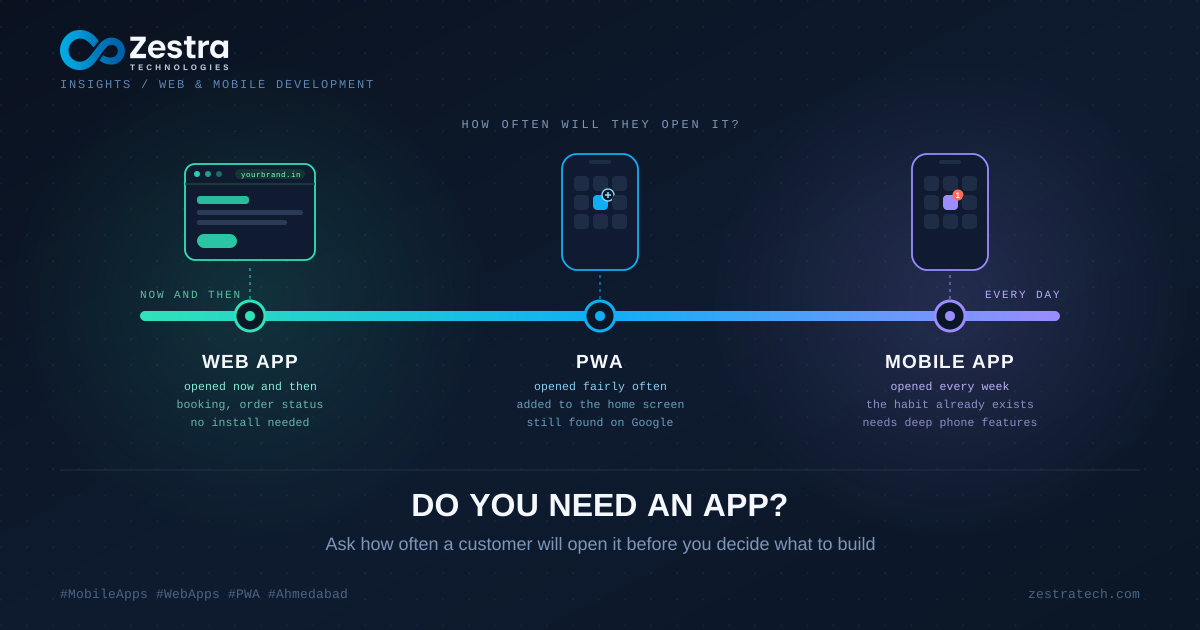
"We need an app." It's one of the most common first sentences in a meeting with a development company. It's also the one that deserves a second look before anyone writes a line of code.
Not because apps are bad. Because "app" can mean three quite different things, and picking the wrong one is an expensive way to learn the difference.
The Three Things People Mean
A mobile app is what you download from the Play Store or App Store. It lives on the phone, has its own icon, and can reach deep into the device.
A web app runs in the browser. Nothing to install. You open a link, log in, and use it, on a phone or a laptop.
A PWA (progressive web app) sits in between. It's a web app that can be added to the home screen, loads quickly, works partly offline, and can send notifications. It feels like an app without going through a store.
Each one suits a different kind of business. Five questions will usually tell you which.
Will People Open It Every Week?
This one matters more than anything else. Apps earn their place on a phone when people use them often: ordering food, tracking a workout, checking a bank balance, following a delivery.
If your customers need you a few times a year, say to book a service or check an order, they won't bother installing anything. Think about your own phone. How many apps did you download for something you use twice? A web link that opens instantly beats an app nobody installs.
Does It Need the Phone's Hardware?
Some features really do need a proper app. Continuous location tracking in the background, close control of the camera, Bluetooth devices, heavy graphics, complex offline work. If the heart of your product depends on those, build an app.
If it doesn't, check what's possible on the web first. Browsers can use the camera, share location, and take payments. PWAs can also send push notifications, though iPhones have only supported that since 2023 and only after the user adds the PWA to their home screen, so confirm the current rules for your case before you rely on them.
How Will People Find You?
A web app shows up in Google. Someone searches, clicks, and is in. An app has to be found in a store, and store search is crowded, so most installs come from marketing you do yourself: ads, social posts, a QR code at your counter, a message to your existing customers.
That's fine if you have a way to send people there. It's a painful surprise if you assumed the store would bring them to you.
Who's Going to Look After It?
A mobile app means two stores with their own review processes, regular updates whenever Android and iOS change, and users who may stay on an old version for months. A web app has one version, and when you fix something, everybody has the fix straight away.
Ask what your budget can sustain after launch, not only for the build. A neglected app slides down store rankings and breaks quietly when the operating system moves on.
What Are Your Customers' Phones Like?
A lot of people, particularly outside the big cities, run phones with limited storage and are picky about what they install. A link they can open in a second, without hunting for space, can be the difference between using your service and not.
Where a PWA Falls Short
It's worth being fair about the limits. A PWA won't appear in the app stores unless you wrap it, which some businesses care about for credibility. Some phone features stay out of reach, especially on iPhones. And people who expect "an app" sometimes don't realise they can add a PWA to their home screen at all, so you may need a short prompt or a line on your counter explaining how. That doesn't rule it out. It does mean you should know the trade before you choose it.
Three Quick Scenarios
A gym with members who check in four times a week and book classes: an app makes sense, because the habit exists already.
A clinic whose patients book an appointment now and then: a fast, well-built web app, or a PWA, serves them better, and it's visible on Google too.
A business selling to other businesses through a dashboard that staff open on a laptop all day: a web app, almost certainly. A mobile version can wait.
The Route That Costs Least to Change
If you're unsure, start with the web. Build a good web app or PWA, watch how people really use it, and let the numbers show whether an app is worth adding. If most of your usage comes from the same repeat users on phones, you'll have solid evidence, and a clearer brief for the app when you build it. If almost nobody returns, you've saved yourself a lot of money.
Our mobile app development and web development teams work on both, so the starting point is whatever fits your customers, not whatever we'd prefer to build.
Before you ask for an app, ask how often a customer will want to open it. The answer settles more than any technology choice.